I'm a software engineer with 15+ years experience working across the web stack, mostly on front end. I thrive in fast-pace startup environments where I can take the lead on big projects.
I'm a software engineer with 15+ years experience working across the web stack, mostly on front end. I thrive in fast-pace startup environments where I can take the lead on big projects.
I'm a software engineer with 15+ years experience working across the web stack, mostly on front end. I thrive in fast-pace startup environments where I can take the lead on big projects.
I'm a software engineer with 15+ years experience working across the web stack, mostly on front end. I thrive in fast-pace startup environments where I can take the lead on big projects.
I'm a software engineer with 15+ years experience working across the web stack, mostly on front end. I thrive in fast-pace startup environments where I can take the lead on big projects.
My chord naming algorithm works somewhat like the one described here but is based on an intentionally more limited set of chords which I've carefully curated here:
I'm loving Plasma 6 so far. Wayland support is much better!
I had been using a keyboard shortcut to switch to the previously-used desktop. When KDE removed it [1], I filed a bug [2]. Hours later, a KDE dev created a new KWin script [3] to replace this functionality, fixing my workflow. THANKS! KDE is awesome!
I'm using KDE on Debian / Wayland because I was forced to [0]. I moved to it from from Gnome, which I was forced to use for similar reasons.
I can't believe it, but I badly miss the "Super" (Windows logo) button on KDE not behaving the same was as Gnome. On KDE Ctrl-F9 does the same thing, but after using Gnome that function became "the" way I flipped between hidden Windows. The "Super" button is right place for it, Ctrl-F9 is far too fiddly. The task bar I was brought up in in my Windows / Mac days is just hopeless for task switching in comparison. The rest of KDE (particularly it's configurability) is better than Gnome, of course.
Except for bugs. KDE has so many UI glitches and bugs compared to Gnome. It drives me nuts. I might give Plasma 6 a go, but if the bug situation hasn't improved I will be moving onto something else. These bugs have nothing to do with Wayland per se.
[0] I have a Thinkpad X1 extreme gen 2. A beautiful laptop on paper also in person because it's 4K OLED screen, but I'd never have another one. Charging from the USB-C connector is a lottery - but can be made to work with enough reinsertions. The 4K screen is scratched by the keyboard because the keys touch when closed. On the gen 2 they pushed the external video path through the Nvidia card. You can get an external monitor to work if you hold your head just the right way. With Debian 11 the right was to run Wayland, and only Gnome supported it well. With Debian 12, the right way is to boot using Gnomes display manager (gdm3) with Wayland, wait until the monitor sync's, then login using your KDE Wayland desktop. If for example you use Gnome as your desktop all you get is blank screens. Other combinations all fail in their own unique ways.
i'm in a similar boat -- i miss being able to tap the super key. i don't mind that the defaults are different, but i'm sad that (since it's considered a modifier key) KDE doesn't allow it to be bound on tap. this prevents me from replicating Gnome's behavior.
On Gnome, the Super (Windows) key does an Expose (show windows reduced-size and non-overlapping) and lets you launch applications (and more).
On KDE 5, the Super key brings up the Application Launcher, which is nice. And Super+W (which isn't too painful to type) does an Expose. But it would be nice if there was an option for Super to do an Expose and bring up Application Launcher.
Yeah, the Gnome Super key hit the sweat spot for me too. As you say, all the things you wanted the desktop to do are available from that one easy to reach button - swapping between windows, pick something from the launcher menu and text search the applications. KDE has so many configuration options it can emulate just about everything Gnome does - but it can't mimic that exactly.
Gnome (and systemd) seems to want to emulate macOS mostly, and as user of macOS I'm not sure why you would want to do that. But macOS has nothing that matches Super key exactly - so well done to Gnome for that innovation.
That button makes me consider whether my sway setup is worth it, as sometimes I think Gnome can achieve something similar. And even with less cognitive load, sometimes!
The "Overview" effect does all that. Switch window, switch desktop, launch apps, drag windows to different desktops and monitors, etc. In KDE5 it appears to be in the list under Workspace→Workspace Behavior→Desktop Effects→Window Management. …I think I may have had to edit `kwinrc` to get it to bind to just Meta without another key, though:
> I'm loving Plasma 6 so far. Wayland support is much better!
I'm jealous. I lasted about half an hour on Wayland, but several apps I use still don't work. xtrlock (anti-cat measures) and freetube both wouldn't work, but worse was that games like Dying Light crash almost immediately. On KDE 6 / X11 it's a little better but the game still craters after an hour. Still figuring out why. Maybe it's because the laptop is an AMD ecosystem.
I don't know about the other apps/games, but I use freetube all the time on my KDE5/Nvidia/Wayland system and have never had an issue with it. Which distro/gpu/driver version are you on?
I'd imagine XWayland Xorg emulation is far from perfect so I wouldn't be surprised if games that depend on that would crash.
That being said, I recently switched to Wayland again after a hiatus and it seems support keeps improving. I'm not using proprietary NVIDIA drivers currently so that might be it.
The thing that you have to remember about Xwayland is that it is Xorg. It just has a Wayland DDX[0] on the back end rather than a device-specific DDX or one that talks e.g., directly to the modesetting driver.
[0] Device-Dependent X, i.e., the bits of X that talk directly to the display. Contrasted with Device-Independent X (DIX), i.e., the bits that do state tracking and protocol communication with clients.
If a game doesn't work in Wayland, you could always launch it in gamescope[1], which AFAIR doesn't expose WAYLAND_DISPLAY by default, so games should treat it the same as an X11 desktop.
I haven't had anything flat out refuse to work on Wayland, but unfortunately Discord won't work right. It runs, but it can't detect that you're AFK any more, so you stop getting messages on the mobile app. It's a bummer because otherwise I would love to use Wayland.
There's a large amount of robustness improvements, particularly around multi-monitor and docking scenarios with dynamic and fractional DPI. We've also introduced technology to allow client apps to stay running should the compositor crash and restart.
We've replaced some originally homebrew Wayland protocol extensions with newer extensions maintained by the wider Wayland community. For example, our own panels now use the layer-shell protocol. This improves interoperability, e.g. enabling third-party panels.
We've added initial support for HDR and color management, in particular for games with HDR rendering (we've been learning a lot about the gaming community and their needs from the Steam Deck).
More complete porting of many little quality-of-life workspace and toolkit features and refinements when running in Wayland.
Performance work.
Screen sharing got a revamp, now supporting RDP and the latest portal dialogs when invoked by apps and so on.
Various other compositor-y bits, e.g. support for the Presentation Time frame scheduling extension, which helps video players and game engines.
Some of these got done in Plasma and KDE software itself, some in Qt 6, where we've been a major contributor to the QtWayland module. Some required contributions to the Wayland protocol stack itself, e.g. the modern focus handover protocol.
I installed plasma6 on my Framework 13 running NixOS this morning, and it was the first time in my life that not only did fractional scaling work out-of-the-box, but it automatically picked the appropriate scale! Love when the little things work so well. Thank you!
I'm not sure if it has anything to do with KDE itself or if it's Kubuntu's fault but one small annoyance I've dealt with is how my wacom drawing tablet is mapped to the screen space. I've had to manually map it so that the tablet touch space isn't spread across three monitors and I've also had this setting get reset. I'm really excited to see more support for multiple monitors coming down the pipe. Do you know anything about the tablet issue or is this something I just need to do some more research on?
Actually you can configure all of this with xsetwacom. I don’t remember the exact commands and it’s mildly tricky but after that you get a configuration file that shouldn’t move (or that you can backup).
Super excited to play around with this on my Steam Deck! Wayland support was actually one of the main reasons I left KDE on my primary machine, eventually in favor of Sway. Really glad to see so much progress has been made on that front :)
That RDP screen sharing is very interesting. Does it require an open session attached to a real screen, or is starting headless remote sessions possible?
Interesting, I just posted a question to Reddit about this[1] but I have been testing and using KRdp myself for a while. I'm one of those users who (due to blah blah blah) must use Wayland, but also must have some remote desktop capability (to connext to my Linux GUI environment).
For this reason, I was stuck on Fedora GNOME for a long while, because only they had it.
KRdp[2][3] looks promising, even though (like GNOME) it requires a GUI session to exist first, before you can connect via RDP. But there are ways to deal with that if you really gotta have it.
But this support is not actually implemented in any app in KDE Plasma 6, is it? My understanding is that it is possible, but there is no built-in functionality to take advantage of it. More "you can build an RDP server now that will work on Wayland" than "there is an RDP server that has been released". (I think?)
I believe[1] this is just attaching to an open session.
From what I have read, login sessions require integration with a login manager, and from what I understand that work isn't done yet (this work being a prerequisite).
It seems[2] that gnome is going to support this in a future release (march?)?
I'm sure KDE will have something similar in the works eventually. I currently use xrdp/xorg-xrdp for headless remote login sessions, and while it works ok, I would love to switch to using something more integrated into kde itself.
also in next point Plasma releases we'll focus to make its experience more out of the box, to be able to configure it from System Settings and what not
>We've also introduced technology to allow client apps to stay running should the compositor crash and restart
Sweet this is one of the reasons I gave up on KDE 5 I tried a couple months ago. Some combination of KVM and amdgpu was causing crashes (I think something to do with hotplugging displays and Wayland) and it seemed like everything downstream got nuked as well
It's safer as every program is isolated but it crashes more often because programs are isolated and expect not to be isolated. I often switch back to x11 whenever I try it I think nice it's fast and has bells and whistles but there basics aren't there. It took x11 a LONG time to be usable so I expect the same with Wayland.
Faster, better support for multiple screens with different geometry, safer, and ultimately maintained. Also, at this point, it works really well, and honestly is not a drag on the user. I moved to Wayland last December and have really enjoyed it. I'm using the KDE Neon distribution, and it's really really really nice.
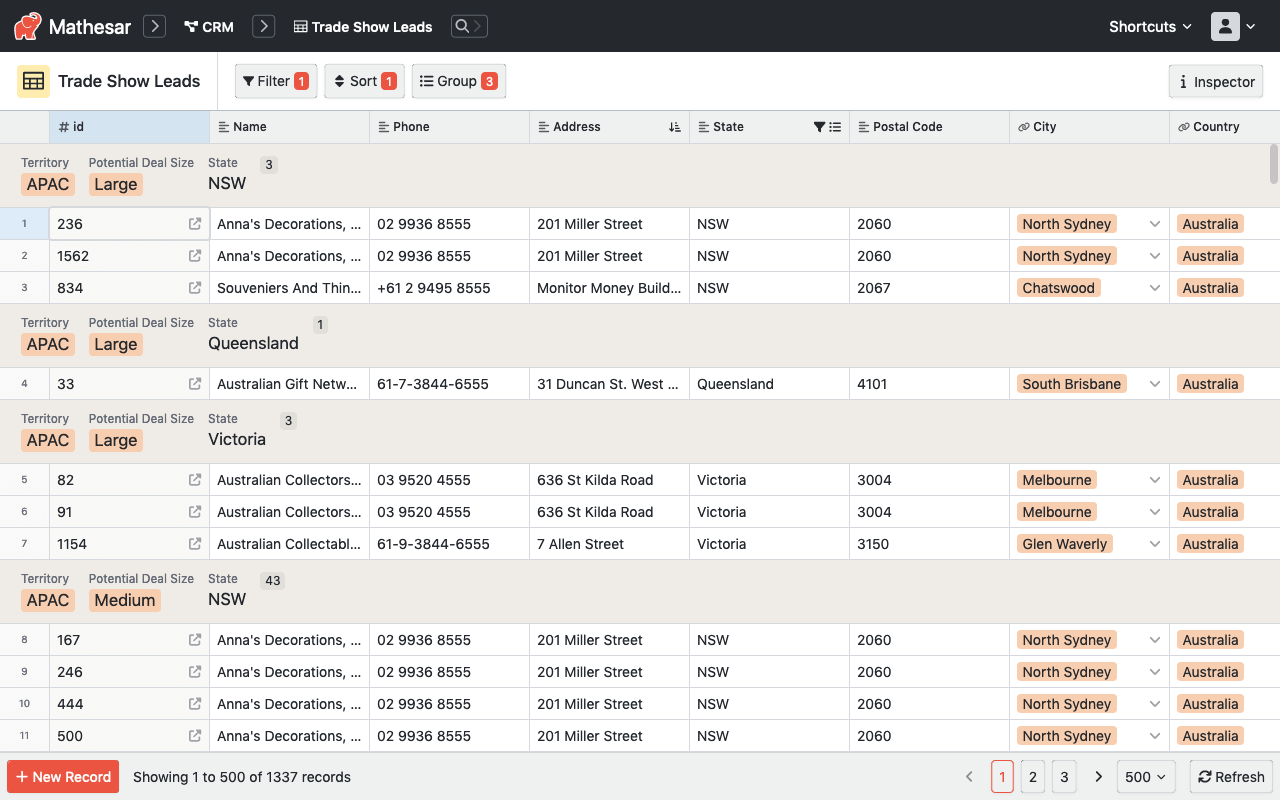
I'm an engineer on the Mathesar core team and I'd just like to clarify that Mathesar does support grouping to some extent. Here is a screenshot[1] that demonstrates the grouping functionality. Grouping levels are unlimited. You can play with this functionality on our live demo[2]. It's worth mentioning that Mathesar does not yet have the capability to expand and collapse groups, but that feature is planned[3].
Best of luck building Visual DB! Nice to see more innovation in this space!
Good question. We've taken a somewhat unique approach of integrating tightly with PostgreSQL in order to leverage its strengths. In the short term, we plan to continue with this focus on PostgreSQL, but we are considering supporting other DBs in the long term. Thanks for your comment though! Knowing that you have an interest in using Mathesar with MySQL is a useful data point for us!
[Baserow], [APITable], [Grist], and [Rowy] are all open source Airtable alternatives which offer hosted SaaS versions that include API access, though it's a bit difficult to compare the API rate limits across all these products.
Self-hosting an app like this would allow you to bypass API rate limits altogether, if you're open to it. All the above products can be self-hosted — and you might want to look at [NocoDB] and [Mathesar] if you're considering self-hosting.
There are some other proprietary Airtable competitors like [Retable], [Retool], [Rows], [Lists], [SeaTable], and [Tables] that might be worth looking at too.
(Disclosure: I'm an engineer on the Mathesar core team.)


Remote: Yes (or on-site in greater Boston)
Willing to relocate: No
Technologies: TypeScript, Svelte, React, Vue, Rust, Python, Django, PostgreSQL, PL/pgSQL
Résumé/CV: https://github.com/seancolsen
Email: colsen.sean@gmail.com
I'm a software engineer with 15+ years experience working across the web stack, mostly on front end. I thrive in fast-pace startup environments where I can take the lead on big projects.