Amazon treats their work staff poorly (at least on the Amazon.com side, if not AWS), and Bezos isn't a very nice human. They throw a lot of their weight around and bully small local governments into succumbing to their conquests. They are a largely unethical company, IMO, and supporting them risks further eroding small business and democratic checks and balances everywhere.
> They throw a lot of their weight around and bully small local governments into succumbing to their conquests. They are a largely unethical company, IMO, and supporting them risks further eroding small business and democratic checks and balances everywhere.
If you strip out the first sentence, and leave the rest... I think you've just ruled out every large corporation, and especially all of the tech megacorps.
Yeah, you're totally right. With cloud (or other) vendors, it's often a "lesser of many evils" kinda thing. Amazon is just particularly and notoriously bad.
Next.js (and probably its competitors) does this same thing (https://nextjs.org/docs/basic-features/data-fetching#getstat...), just much more elegantly and modularly, allowing you to work with any headless CMS while still maintaining the benefits of a static, "baked" dataset that gets deployed alongside static code. It just caches API responses at build time into local JSON.
The thing is, no matter how you bake the data, it has to be edited somewhere. That "somewhere" is rarely good as Markdown files or or SQLite for all but the most trivial implementations. In real-world mid-sized websites, content editors want something easier to work with. Having an actual CMS, even if it's just a decapitated Wordpress, makes their lives much easier. And you can still get the benefits of baked data.
With incremental static regeneration (https://www.smashingmagazine.com/2021/04/incremental-static-...), you also get the benefit of post-build on the fly revalidation and "rebaking" without requiring a full rebuild, courtesy of a server that checks for data updates in the background and rebuilds only the affected pages.
There's nothing to stop you implementing a WordPress-style CMS as part of this pattern, then baking its database on every deploy and shipping that as a copy.
It means users won't get instant deployment of their edits though, which depending on your use-case may be a non-starter.
The Mozilla.org site I reference in the article appears to use Django (potentially with the Django Admin CMS tool) to manage the data, but then bakes and distributes a SQLite file with the data that has been managed by Django.
> It means users won't get instant deployment of their edits though, which depending on your use-case may be a non-starter.
That's what the "incremental static regeneration" I mentioned does. Every time the data changes, Next.js catches it within your specified revalidation period, and then rebakes only the affected pages by updating their local caches. It's magical.
Better still, with this system, you never have to manage the database layer yourself. There is a CMS, yes, but if you go headless in the cloud, that's someone else's scaling problem. Any edits, whether at build time or subsequently, get baked into static HTML + JS that can be served from any CDN.
I think I see what you mean - so your production site is hosted entirely from a static CDN, but you have an intelligent build process running somewhere that can re-generate and then re-publish just a subset of the files when the underlying data changes?
The downside is that most of that is black-box magic. It's not clear to me whether it's a secret npm server, some serverless function, or something else entirely doing that "intelligent build process". But by and large it does work, way better than I expected it to.
In detail:
1) On static pages, you can set a revalidation period (say 60s)
2) Those static pages are always served from the CDN cache, regardless of whether there is a set revalidation. Visitors always get baked HTML + cached JSON data, regardless.
3) Visitors 1, 2, 3, 4 visit within moments of each other, and each see the same cached page.
4) Visitor 5 happens after the 60s revalidation period. They STILL see the same cached pages as visitors 1-4, BUT this also triggers a staleness check against the data origin. (This is the part that's black magic; I'm not really sure how it's doing that. It "just works" if hosted on Vercel; on other providers it may be necessary to spin up a separate `next start` node server. It's entirely unclear to me).
5) Behind the scenes, Next.js via its magic sees new data and rebuilds the affected page. It takes a while, though (maybe a minute or so depending).
6) Visitor 6 visits at 65 seconds, not quite enough time for the new page to have been built. They still see the same cached version as visitors 1-5.
7) But visitor 7 visits a minute later, at 150 seconds, and by this time Next has updated the cache. Visitor 7+ see the newly baked page, with the updated data.
8) The cycle repeats every 60 seconds.
So in production, new visitors will see updated baked pages pretty soon after the data change is made in the CMS. Caveats: it's not "instant" per se (just soon), and it requires a sacrificial visitor (visitor 5 in our example) -- or a editor or bot pretending to be a visitor -- to trigger that staleness recheck by visiting the page.
If you need truly realtime, pushed updates straight from the CMS into your Jamstack, that requires even more workarounds on top of the Next.js ISR that I described above. Some CMS vendors have proprietary solutions to this, like DatoCMS's real-time updates API (https://www.datocms.com/docs/real-time-updates-api) but I don't think there is necessarily a solved, best-practices model to refer to. Basically some sort of pub/sub using workers and server-sent events. But that gets pretty complicated vs clientside polling of updates. A slightly different problem from updating baked data in near- (but not actual) real-time.
It doesn't necessarily solve RoAS tracking either. If you only have information on some % of your purchasers* and you optimize against that small, self-selecting sample, you may entirely miss other groups of higher spenders who just don't want to be tracked.
It might help answer the question "which campaigns are performing better relative to each other" as long as we assume that no campaigns are more likely to affect opt-in rates than others. It may even be an improvement over up-front consent seeking, if the theory is that a better checkout UX with less upfront annoyances results in better opt-in rates later on. But it doesn't really answer the bigger question of "is this the best place to spend my marketing dollars" vs, say, investing in campaigns/platforms that may have greater reach but less transparent funnels (comparing a Google Ad to a Superbowl TV ad, for example).
If you use this in a vacuum without any statistical modeling thought, you end up optimizing against algorithmic limitations rather than real customers. At the end of the day you're drastically reducing your sample size, and not in a representative, random manner. Your opt-in users are behaviorally different from the majority of people, and it wouldn't be a good idea to make big decisions based on their actions alone. They are essentially a cheaper focus group, with all the pros and cons of such.
Let’s say we have 12 iron mines with known amounts of iron ore supply, and 10 steel foundries with known amounts of demand. For each (mine, foundry) pair, there is a known cost of shipping the ore from point A to B. Which mines should send how much ore to which foundries?
AIUI, that is the general “optimal transport problem”. Now replace ore with colors and it applies to the problem above :)
Wordpress is low-code in the sense that somebody else wrote most of the code already, but it's incredibly high-maintenance. At some point some plugin is going to break or the cache is going to be stale in some obscure way and you're going to have to debug it, and chances are the client added some of their own plugins (if you allowed them) and they all interact in some wonky way leading to a cascade of bugs that only manifest in a perfect storm. Ugh.
(not trying to be snarky here... we're moving away from a LAMP stack just because after deployment it tends to be like 95% devops just to keep the website up and running as plugins get outdated and core deprecates things. It's a drain on dev time. Some Wordpress hosts use screenshot-based autoupdates and compare before & afters, and that helps, but isn't perfect.)
I've been running Wordpress blogs and helping people with theirs for a long time, and simply never had that much maintenance to deal with. Sure, if you let them go nuts with plugins it will go wonky, so don't. If they install a plugin that breaks everything, uninstall it and help them figure out a better solution.
Wordpress out-of-the-box just works. Stick to the basics, and you'll be fine. And for the use case of OP, that is exactly what they seem to be talking about - a basic portfolio site. If you need more than the basics, that is when you leave Wordpress. It sounds like you might be getting into trouble because you are pushing Wordpress way past its core use case.
I've never seen a Wordpress site meeting only its "bare use case" that wouldn't have been better served by Wordpress.com itself (the hosted managed service) or Squarespace. The clients who've hired me did so explicitly to push Wordpress past its defaults, whether through the use of something like a page editor (WPBakery/Elementor/etc.) or an events plugin or another or some contact form... those are all basic, common usages that still require maintenance.
If their use was basic blogging, I try to steer them away from needing to hire a dev at all (why spend the money?).
Hey, we're in a similar situation and we just evaluated a bunch of different options. Just wanted to share some findings.
One, in terms of integration, if you're considering headless you probably already are thinking of a decoupled solution (meaning frontend and CMS are separate anyhow). In that case, it might help to think about the CMS as just another generic API that your frontend has to speak to instead of "integrating" with via bespoke SDKs.
These days, many vendors offer GraphQL output for their content delivery APIs, and that's really easy for Gatsby or Next.js or graphql-request or node-fetch to consume. The resulting shape (object schema) you get back as a response is easy to map into component trees and iterables. Many (most?) headless vendors offer GraphQL endpoints now, and while it's not perfect, for most pages it'll be easier than having to join together multiple REST calls (like one call for posts, another for authors, a third for tags, a fourth for related items). GraphQL makes that all one API call returned as a nested JSON.
Among headless options, there were initially 20+ vendors to choose from (this site has a list: https://cms-comparison.io/). As the primary dev, I did a first pass and eliminated a few right off the bat that I didn't think would fit our needs. Then we asked the other stakeholders to participate in a pretty exhaustive weighted features comparison (https://airtable.com/shrDPlmk7R3B4ddO1), having each stakeholder compare features across each CMS, then weighing each feature by their importance to our project. While we didn't choose the final winner this way, it did help narrow our initial list of 20+ options down to a more doable 2-4 finalists. We built functional prototypes (choosing a complex enough page to showcase the CMS's capabilities) and demoed them to the stakeholders and began contract negotiations.
We learned a lot from that process for our own needs, and I'd encourage you to pick a few and run a similar analysis just for yourself and your client, based on their needs. For example, will they require deeply nested content models (like a page that contains a section that contains an accordion that contains a WYSIWYG that contains a paragraph with a CTA button that opens up a modal that they can define in the CMS).
Some of the options are better at handling that sort of thing (GraphCMS, Contentful), but that comes with tradeoffs in other parts of the editor experience. It seemed in our evaluation that the CMSes that were the most flexible in terms of nestable content models were also the ones that didn't offer as good a page composition experience, as in being able to visually drag and drop things around a page (move the accordion above the hero) in an intuitive way. The market is still trying to figure out how to best do their UIs and UXes. Some of them treat every field and model as equivalent primitives, meaning you build everything up from the deepest nested layer (usually something like a "button" or "image with caption") then add containers within containers on top of that. But that quickly becomes visually and mentally overwhelming for the editors, who usually think about pages not in terms of nested schemas but the functionality that they want to add. Some of the other options, then, purposely avoid the "everything is a model" design and break things down into pages, posts, blocks, etc. (DatoCMS, Storyblok, ButterCMS). In any case, it's worth poking around a few of them and trying to model a complex page or two in their schema builder (model editor) to see if the resulting page would be easy enough for a non-dev editor to use and edit.
Among open source packages, to my overwhelming surprise, Wordpress with Advanced Custom Fields (https://www.advancedcustomfields.com/) was far and away the MOST powerful of any of the headless CMSes, offering extremely flexible field layouts that none of the proprietary headless vendors even came close to. This created, IMO, the best editor experience in that it was the only one where you could present columns as actual side-by-side columns, accordions as repeater fields, etc. Of all the options we saw only ACF closely mirrored the actual HTML structure while still being good for editors to use. All the others required workarounds in editor experience or developer experience, usually in some form of DRY-breaking similar but redundant models, like 5 types of accordions depending on what they had inside. If your pages are super complex ACF would be the one I look at first. The downside is that it's still Wordpress at its core, which means you having to maintain a separate stack in PHP, along with requisite plugins for Wordpress shortcomings (translations, GraphQL, taxonomies, image handling, etc.)
On the plus side, if you use Wordpress + ACF in a headless way (with either Wordpress REST API or Wordpress GraphQL plugins), it circumvents most of the Wordpress security issues since all you're doing with it is exposing a read-only REST endpoint, which you can further cache behind Cloudflare or similar if you want to. You never have to touch Wordpress's theming, for example. Hosting Wordpress on a managed stack like Pantheon or Gridpane helps a lot with both the developer experience (automated backups, updates, recoveries, etc.) and the reliability since they manage all of the scaling and CDN and such, which would normally be hard to do with something as LAMPy as Wordpress. I can put in very strong recommendation for Pantheon; they are one of the best companies I've ever worked with.
ACF was SO much more powerful than other open-source headless CMS solutions (Ghost, Directus, Sanity, Strapi, Grav) that it frankly surprised me. Never did I expect that an old plugin for the Wordpress monolith would actually be one of the best headless options.
But if your site doesn't require complex modeling, one of the headless vendors might just be fine, and it would be a lot less for you to have to maintain. The ones that stood out to me (in no particular order) were:
* DatoCMS for its fairest pricing (vs Contentful's enterprise-only mentality) and its small but very responsive team. It's a hidden gem in a field mostly run by bigger companies, an underdog for now but quickly catching up to the bigger players. It also had one of the best editor experiences, a great media library system that handles cropping via "focal points", and Imgix image transformations built-in and included.
* Prismic.io for its remarkably clean editing environment for simple pages (but the lack of field validations was an issue for us)
* GraphCMS for the sheer cleanliness of its schemas and being one of the few to offer GraphQL mutations (which means you can edit/add content via GraphQL; most of the others only support reads, and writes would use more traditional REST APIs). This one just seemed the most technically sound, but with tradeoffs in the editor experience (like something as simple as a dropdown field uses only machine-readable values and no human-friendly labels)
* Contentful is definitely the industry giant here, but they are very expensive and have shifted their business model away from small developers. Basically either you fit within their starter plan or you have to jump into their enterprise tier. They don't really cater to small businesses anymore.
* There are so many other options, like AgilityCMS, ButterCMS, CosmicJS, CraftCMS, KeystoneJS, NetlifyCMS... and they are all rapidly changing, so check in on them for latest features if none of the above ones are quite right for you.
As a final note, if your client's needs are SUPER simple, something like a Google Sheet or Airtable's REST API (https://airtable.com/api) might suffice. Those are far easier to edit (like if all they needed were simple blog posts or product pages) but not very powerful/extensible in the long run.
I use ACF but I can't tell what makes it significantly different from any other headless CMS schema modeling systems in Strapi and etc. Can you say more?
In terms of modeling, it handles nesting extremely well (repeater fields, Flexible Content Field). It has powerful conditionals (show X button if Y field = Z).
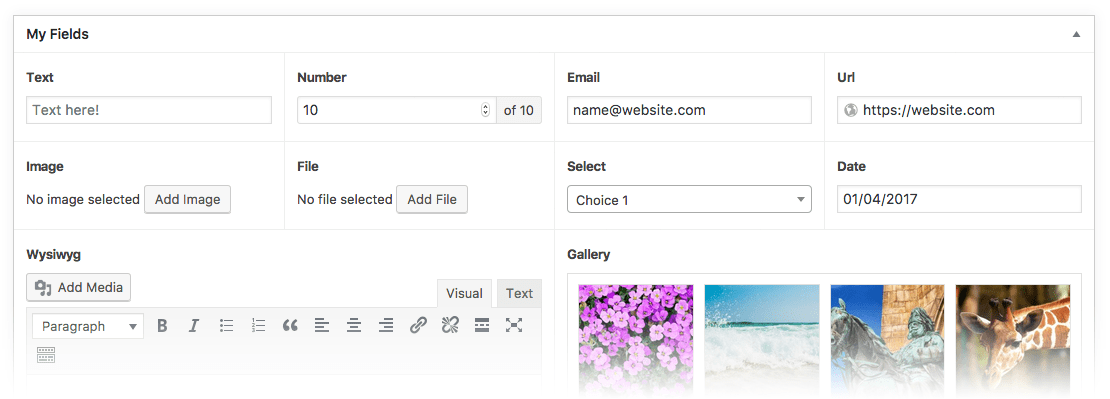
In terms of layout, it can present a layout of fields like this sample (https://www.advancedcustomfields.com/wp-content/themes/acf/a...) whereas most headless CMS just show fields one after another in one long list, or at most inside a collapsible accordion.
The combination of nestable, reusable blocks + conditional fields means that you can really make the editor experience streamlined if you put in the time to design a good layout.
The other CMSes don't really give you that choice; you're bound by their editor frontend's limitations (as in you can't rearrange fields, can't group them together logically, can't put them into tables or columns or rows).
It's the kind of stuff that doesn't matter to devs much (it's all JSON once it gets to us) but can make the editor experience more intuitive.
Edit: Also, coupled with custom Wordpress taxonomy plugins, it allows you to model things that aren't necessarily pages (menus, products, quotations/testimonials, events, etc.). Many of the other FOSS CMSes use file-based models in which every model has to be a file/page. You can often work around that but it's not very intuitive, like if you wanted to nest a testimonial inside an accordion on a product page, how do you model that? It's pretty easy in ACF or the DB-based headless CMSes, not so easy in the file-based ones.
"Really bad" is an exaggeration, I think. The auto-transcription features in both Google Meet and Zoom are more than acceptable, they're often very useful in catching missed words during a meeting.
They trip up on technical jargon but handle everyday conversations just fine, including speaker detection, punctuation, idioms, etc.
But that's also a slightly different use case, where each speaker is in their own (somewhat) quiet environment and on separate connections (and thus audio tracks).
It's much harder to do all that after the fact, like with a recorded video.
I find Trint.com, which is partially automatic, to be good for that... the AI does a first pass, and a human cleans it up afterward. YouTube has a similar assisted-auto feature for their captions, minus speaker separation.