I recently changed ISPs and have IPv6 for the first time. I mostly felt the same way, but have learned to get over it. Some things took some getting used to.
An "ip address show" is messy with so many addresses.
Those public IPs are randomized on most devices, so one is created and more static but goes mostly unused. The randomly generated IPs aren't useful inbound for long. I don't think you could brute force scan that kind of address space, and the address used to connect to the Internet will be different in a few hours.
Having a public address doesn't worry me. At home I have a firewall at the edge. It is set to block everything incoming. Hosts have firewalls too. They also block everything. Back in the day, my PC got a real public IP too.
NAT really is nice for keeping internal/external separate mentally.
I'm lucky enough my current ISP does not rotate my IPv6 range. This, ironically, means I no longer need dynamic DNS. My IPv4 address changes daily.
A residential account usually gets a /56, what are you talking about? Nowhere near a /48! (I'm just being funny here...)
There are reasons to need direct connectivity that aren't hosting a server. Voice and video calls no longer need TURN/STUN. A bunch of workarounds required for online gaming become unnecessary. Be creative.
I'm not confused about the NAT / firewall distinction, but it might be nice if my ISP didn't have a constant, precise idea of exactly how many connected devices I owned. Can that be _inferred_ with IPv4? Yes, but it's fuzzier.
Okay but why does this matter? They're your ISP they also have your address, credit card number and a technician has been in your home and also supplied the router in the common case.
The theoretical vague problem here is being used to defend a status quo which has led to complete centralization of Internet traffic because of the difficulty of P2P connectivity due to NAT.
The ISP still doesn't know how many devices are connected, because a lot of those devices are using randomized and rotating IPs for their outbound connections.
On Linux, I think the defaults are left up to the distros so there is a chance of a privacy footgun there. Hopefully most distros follow the example set by Apple and Microsoft (a sentence I never thought I would write...)
All desktop/mobile OSes today use "Stable privacy addresses" for inbound traffic (only if you are hosting something long-term) and "Temporary addresses" for outbound traffic and P2P (video/voice calls, muliplayer games...) that change quickly (old ones are still assigned to not break long-lived connections but are not used for new ones).
We had two kids (newborn and 3) in car seats and a Ford Focus. The other car was a Jetta.
The Focus even had a small aftermarket amp and sub in the trunk. Everybody and their things still fit, although the sub did come out for long trips for that extra cargo.
The Golf Wagon that came later still fit us and the dog. About 90lbs of her would fit in the back and she could drool all over the kids.
Every safety measure faces a question of whether the resources allocated to it are an efficient means of achieving that reduction in risk.
To GP's point, we probably can't prevent people from crashing altogether, but we currently have a road system designed to sacrifice safety on the altar of throughput [0]. How many more or fewer kids (or just people) would die if governments allocated the resources to making roads safer that they currently mandate their citizens use on car seats?
> I don't need a guard on my table saw if I don't stick my thumb in it. Don't need a helmet if I don't fall off of my bike.
Do you think the guard on your table saw makes you safer than training and experience using the saw safely? There are always limited resources and multiple routes to safety, so we shouldn't assume any given safety measure is the best use of those resources (especially in consideration of second-order effects).
Basically any computer is a router if you're brave enough.
Windows PCs had (have?) that Internet connection sharing feature for a long time. It was really just a checkbox to enable NAT too.
Sometimes I think combining a firewall/router/switch/AP/file server/etc into a device called a "router" really confuses people. Even people who should know better.
It is much, much easier than it used to be. The documentation and videos alone available make something like this a very welcoming learning experience that anyone can complete step by step by pausing a video and replaying it.
Like most things, really. I used to build routers from old PCs, but eventually those tiny appliances caught up with the performance/functionality I need.
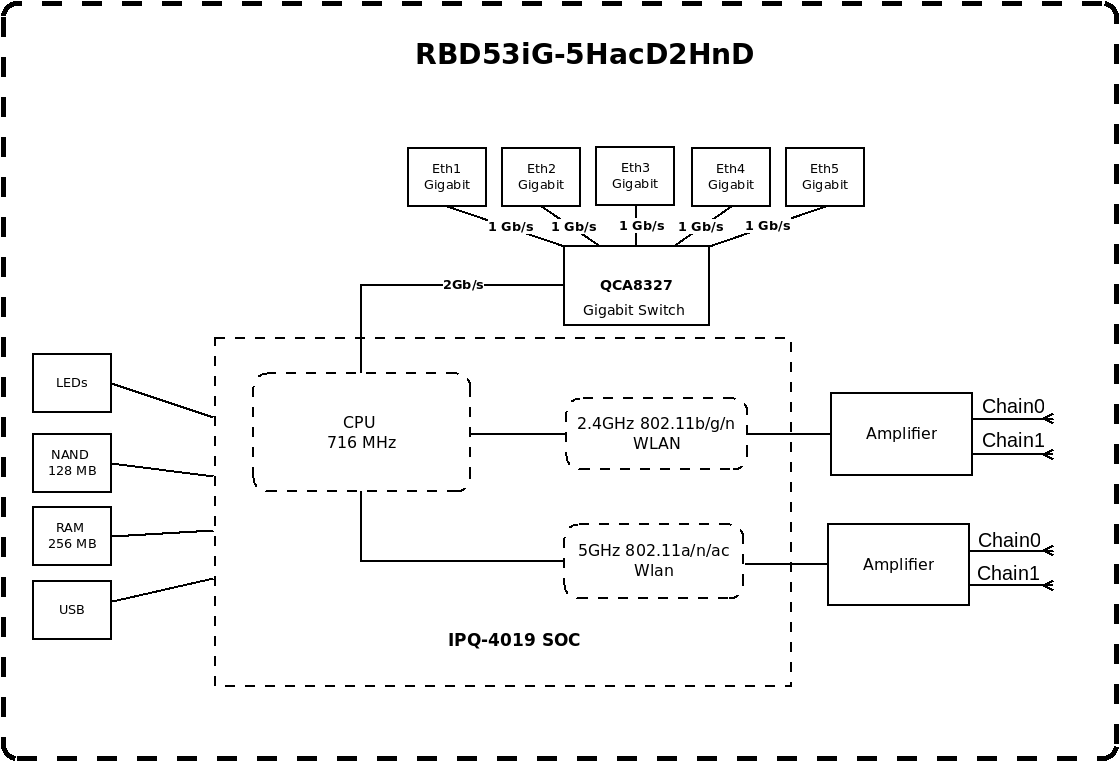
You can do a lot of routing on a $70 Mikrotik, although they might not be "easy".
On printed page five of the brochure [0] it mentions
  Size of RAM   32 GB ECC
  RAM type      DDR4
On the one hand, it'd be nice if that was mentioned everywhere that the RAM size was mentioned. On the other hand, perhaps ECC RAM is effectively mandatory for Enterprise equipment, so mentioning it is redundant? IDK, I don't often purchase that sort of stuff.
For sure, it's a path and passage towards devices like that.
Everyone has a starting point, starting with soemone has lying around is one thing.. the quicker they can get going the more they can get to leveraging the real power in most devices.
the naming is part of the confusion. consumer "routers" are really NAT gateway + DHCP server + DNS cache + WiFi AP + maybe a firewall, all in one box. separating them makes each piece clearer.
Iirc classic WRT-841 and similar "300Mbit WiFi" generation 4-100Mbit-ports Wi-Fi routers had the CPU attached via an on-SoC gigabit link to a vlan capable switch that has the 4 100BASE-TX ports exposed.
I was outside talking to some friends one time and heard somebody talking in my pocket. It was an emergency operator.
The power button on my iPhone must have been pushed the 5 times or whatever it took. It is probably a good feature when it saves a life but a little too easy to waste their time with too.
"There is more than one fish in the sea" has been relationship advice for centuries. It might be about being dumped, but I've also thought it useful for considering dumping somebody too.
No, that's not it. We're talking about posts like "we had a silly little quarrel about something that would need fifteen minutes to clear up and make both happy if we both just try to adult a bit" and commenters being adamant that deleting gym and facebooking up and so on is clearly the only choice. Most of said commenters probably not being in any position to give advice on relationships to others.
The situation you describe has dynamics that don't apply when your windows laptop is trying to get you to install an update. A woman can't have 100% confidence that saying no won't trigger a man into rage, so just the question being asked at all is already a bit unpleasant. WinRAR trying to get me to buy a license is not as offensive because I know it won't beat me up for saying no.
However, do you think people accept Microsoft backup because they want a backup?
Or do you think they click yes because it makes the popup go away for good?
Wearing me down until I say yes isn’t the same as just yes.
It’s the same dark pattern for the 10-11 upgrade. My father in law managed to upgrade by accident because it kept popping up. He didn’t really make an informed choice for himself. One day he just couldn’t figure out why everything was different.
Probably not the norm, but I use a large 4K monitor and no scaling.
I haven’t maximized a window in years. They look ridiculous like that. Especially web pages with their max width set so the content is 1/4 the screen and 3/4 whitespace.
Do you have the brightness on your monitor set really high or something?
I frequently use macOS on a projector, it doesn't quite fill my wall floor to ceiling but it comes close. I don't use full screen often, but I do it occasionally as a focusing strategy, and it's fine.
Doesn't bouncing off the wall just effectively make the "backlight" dimmer? The light reflected off the wall is hitting your face versus the light from the screen hitting your face. It's still light regardless.
If you're using a monitor in the dark the way you use a projector, you should turn the backlight down. If you're using it in a well lit room, the brighter backlight should have less of an effect.
> The light reflected off the wall is hitting your face versus the light from the screen hitting your face. It's still light regardless.
It sounds to me you've never actually looked at a monitor display large swaths of white before, it's brighter than light hitting a wall for sure, even with the brightness down, extra so when the ambient lightning is dark too.
I've definitely seen large monitors that are unpleasantly bright in the dark, but I've also seen an overly bright projector that was similarly unpleasant. I genuinely don't understand why changing the backlight wouldn't fix everything. A projector's image isn't diffuse like a lightbulb, if it was you wouldn't see an image.
A tiling window manager adds a bunch of keyboard shortcuts I can’t get used to. Not worth the mental load of having things change places on their own either.
It’s probably a me problem, but I’m going to open stuff and then leave it scattered around all day. It’s fine.
I don’t use more than a couple of virtual desktops either. Just one for current tasks and one for background apps.
I have three 27" screens (iMac in the center and two thunderbolt displays on each side) and I use most of my "daily driver" applications fullscreen (single monitor). So, things like Xcode, VSCode, web browsers, mail, Quicken, Spreadsheets and Word Processing, and so on. This gives me usually at most 3 things to do at once. Occasionally, for smaller apps, like calculator, messages and so on, I won't fullscreen them. But for my main workflows, it's fullscreen all the way.
My actual biggest pet peeve with this setup is the vast number of web sites that deliberately choose to limit their content to a tiny column centered horizontally in my browser, with 10cm of wasted whitespace on each side.


An "ip address show" is messy with so many addresses.
Those public IPs are randomized on most devices, so one is created and more static but goes mostly unused. The randomly generated IPs aren't useful inbound for long. I don't think you could brute force scan that kind of address space, and the address used to connect to the Internet will be different in a few hours.
Having a public address doesn't worry me. At home I have a firewall at the edge. It is set to block everything incoming. Hosts have firewalls too. They also block everything. Back in the day, my PC got a real public IP too.
NAT really is nice for keeping internal/external separate mentally.
I'm lucky enough my current ISP does not rotate my IPv6 range. This, ironically, means I no longer need dynamic DNS. My IPv4 address changes daily.
A residential account usually gets a /56, what are you talking about? Nowhere near a /48! (I'm just being funny here...)
There are reasons to need direct connectivity that aren't hosting a server. Voice and video calls no longer need TURN/STUN. A bunch of workarounds required for online gaming become unnecessary. Be creative.
reply